
What the 24-hour window is
WhatsApp only lets you write freely for 24 hours after the contact's last message. Outside that window you need an approved template.
On this page
WhatsApp does not let you message someone whenever you like. You can only reply freely during the 24 hours following the contact’s last message to you. That is the window, and it is Meta’s rule: Konverda reflects it, it does not invent it and cannot extend it.
When it opens and when it closes
The window opens every time the contact writes to you, and closes 24 hours after that message.
There is exactly one way to reopen it: the contact writes again. Nothing you send reopens it — not a template, not opening the conversation in the app. A template can invite them to write; if they do, their message opens the window again.
What you see in «Conversaciones» (conversations)
In «Conversaciones» → «Bandeja» (inbox), every row carries a coloured dot for its window:
- green — more than 6 hours left
- amber — 6 hours or less
- grey — the window is closed
In «Prioridades» (priorities) the state is spelled out: a rough countdown («3h 12m») or the word «Cerrada» (closed). Inside a conversation, the header shows the exact countdown and the context panel repeats it in the «VENTANA 24H» (24 h window) tile.
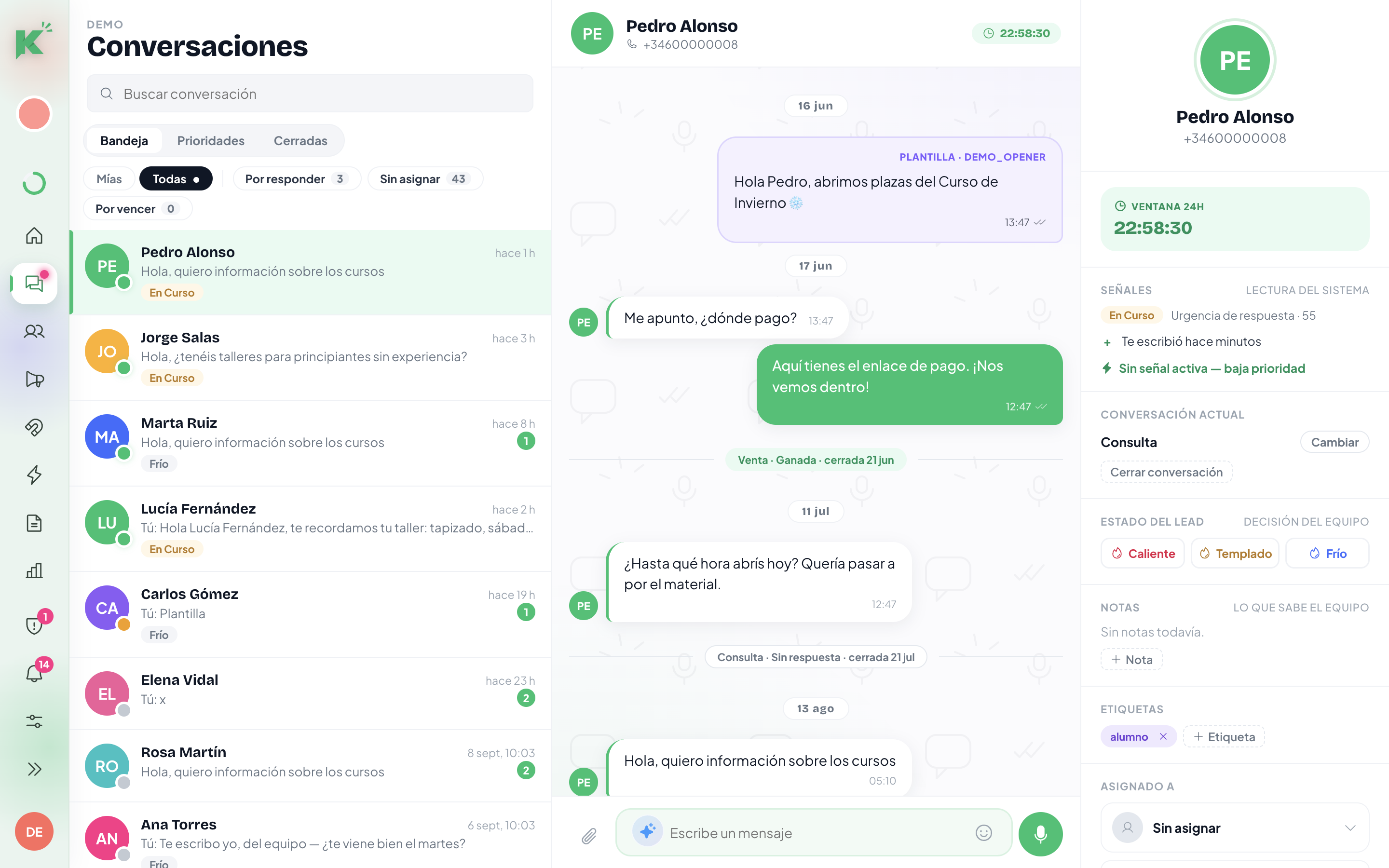
The «Por vencer» (expiring soon) filter
The «Por vencer» chip is not the same as the amber dot. It shows only conversations that meet both conditions: less than 6 hours left and you still owe a reply. That is the queue that is genuinely urgent, and it is what the «Por vencer · < 6 h» tile on «Inicio» (home) counts.
What happens when the window closes
The message box disappears and a locked panel takes its place. What it says depends on the contact:
- They opted out — no way through and no button: the opt-out always wins.
- They are a marketing contact — you can reopen: the «Elegir plantilla» (choose template) button appears.
- They did not accept marketing — templates cannot go out either. The panel explains it and offers «Añadir a marketing» (add to marketing), which you should only use if you genuinely have their consent.
Reopening with a template
- Press «Elegir plantilla» in the locked panel. «Reabrir con plantilla» (reopen with a template) opens.
- Pick a template Meta has approved. Templates in review or rejected do not appear.
- Fill in the variables it asks for. The preview shows the final message before it goes.
- Send. The message leaves through the send queue, not all at once.
If the contact replies, the conversation reopens and you can write freely again for another 24 hours.
Voice notes and media
A voice note can only be sent inside the window. It can never open a conversation, because templates do not accept audio. The app warns you when you build a flow with audio in it.
Automating the close
Two places where the window shows up when you automate:
- The «La ventana de 24 h expira» (the 24 h window expires) trigger, for people who are going cold on you.
- The «Si la ventana de 24 h está cerrada» (if the 24 h window is closed) setting on a flow’s message steps, with four exits: wait for them to write again, send an approved template, hand over to a human, or end the flow.
Still stuck? Contact support